2016年11月12日 星期六

11/11 期中考 第一人稱跟球 材質與貼圖


using UnityEngine;
using System.Collections;

public class NewBehaviourScript : MonoBehaviour {
public GameObject obj_Player;
// Use this for initialization
void Start () {

}

// Update is called once per frame
void Update ()
{

obj_Player = GameObject.Find("Sphere");
if (Input.GetKeyDown (KeyCode.A)) {
obj_Player.transform.position += new Vector3 (-0.1f, 0, 0);
} else if (Input.GetKeyDown (KeyCode.D)) {
obj_Player.transform.position += new Vector3 (0.1f, 0, 0);
} else if (Input.GetKeyDown (KeyCode.W)) {
obj_Player.transform.position += new Vector3 (0, 0, 0.1f);
} else if (Input.GetKeyDown (KeyCode.S)) {
obj_Player.transform.position += new Vector3 (0, 0, -0.1f);
}
}
}

2016年11月3日 星期四

11/4 Slider控制顏色

unity

using UnityEngine;
using System.Collections;
using UnityEngine.UI;
using System;
using System.Linq;
using System.Collections.Generic;

public class NewBehaviourScript : MonoBehaviour {

// Use this for initialization
void Start () {

}

// Update is called once per frame
void Update () {

}

public void myfun()
{
float rnum=0;
rnum=GameObject.Find("Slider").GetComponent<Slider>().value;
Text mytxt=GameObject.Find("Text").GetComponent<Text>();
mytxt.text =rnum.ToString();
Image img = GameObject.Find ("Image").GetComponent<Image> ();
img.color = new Color(rnum, 0.0F, 0.0F, 1.0F); // (紅red,綠green,藍blue,透明)
}
}

using UnityEngine;
using System.Collections;
using UnityEngine.UI;
using System;
using System.Linq;
using System.Collections.Generic;

public class NewBehaviourScript3 : MonoBehaviour {

// Use this for initialization
void Start () {

}

// Update is called once per frame
void Update () {

}

public void myfun()
{
float rnum = 0, rnum1 = 0, rnum2 = 0;
rnum=GameObject.Find("Slider").GetComponent<Slider>().value;
rnum1=GameObject.Find("Slider1").GetComponent<Slider>().value;
rnum2=GameObject.Find("Slider2").GetComponent<Slider>().value;
Image img = GameObject.Find ("Image3").GetComponent<Image> ();
img.color = new Color(rnum, rnum1, rnum2, 1.0F); // (紅red,綠green,藍blue,透明)
}
}

2016年10月28日 星期五

10/28 3d地形 第一人成控制器


先去商店下載模組 關鍵字 「terrain」
添加 3D object>terrain
依個人喜好繪製地形 裡面有不同大小效果的筆刷
再來匯入第一人稱控制器
Assets>Import Package>Character
再將第一人稱控制器放上地圖即可

2016年10月15日 星期六

2016/10/14 倒數計時

c#


using System;
using System.Collections.Generic;
using System.ComponentModel;
using System.Data;
using System.Drawing;
using System.Linq;
using System.Text;
using System.Threading.Tasks;
using System.Windows.Forms;

namespace WindowsFormsApplication2
{
    public partial class Form1 : Form
    {
        DateTime dtNext;
        TimeSpan RemainderTime;
        public Form1()
        {
            InitializeComponent();
        }

        private void timer1_Tick(object sender, EventArgs e)
        {
            textBox1.Text = DateTime.Now.ToString();
        }

        private void button1_Click(object sender, EventArgs e)
        {
            timer2.Start();
        }

        private void button2_Click(object sender, EventArgs e)
        {
            timer2.Stop();
        }

        private void timer2_Tick(object sender, EventArgs e)
        {
            RemainderTime = dtNext-DateTime.Now;

            string diffHour = Convert.ToString(RemainderTime.Hours);
            string diffMin = Convert.ToString(RemainderTime.Minutes);
            string diffSec = Convert.ToString(RemainderTime.Seconds);
            label1.Text = "還有" + diffHour + " 時 " + diffMin + " 分 " + diffSec + " 秒 ";

        }

        private void Form1_Load(object sender, EventArgs e)
        {
            dtNext = DateTime.Now.AddMinutes(2);

        }
    }
}
=======================================================================
unity
using UnityEngine;
using System.Collections;
using UnityEngine.UI;
using System;

public class NewBehaviourScript : MonoBehaviour {

// Use this for initialization
void Start () {
}
// Update is called once per frame
void Update () {
        DateTime Now = DateTime.Now;
        Text mytxt = GameObject.Find("Canvas/Panel/Text").GetComponent<Text>();
        mytxt.text = ""+Now;
    }
}


2016年10月7日 星期五

2016/10/7 剪刀石頭布

c#
using System;
using System.Collections.Generic;
using System.ComponentModel;
using System.Data;
using System.Drawing;
using System.Linq;
using System.Text;
using System.Threading.Tasks;
using System.Windows.Forms;

namespace WindowsFormsApplication1
{
    public partial class Form1 : Form
    {
        public Form1()
        {
            InitializeComponent();
            aaa();
        }

        private void button1_Click(object sender, EventArgs e)
        {
            Random crandom = new Random();
            int myrandom = crandom.Next();
            int c = myrandom % 3 + 1;
            textBox1.Text = "亂數" + c.ToString();
            if (c == 1)
            {
                aaa();
                button2.Visible = true;
            }
            if (c == 2)
            {
                aaa();
                button3.Visible = true;
            }
            if (c == 3)
            {
                aaa();
                button4.Visible = true;
            }
        }

        private void aaa()
        {
            button2.Visible = false;
            button3.Visible = false;
            button4.Visible = false;
        }
    }
}

=======================================================================
unity
using UnityEngine;
using System.Collections;
using UnityEngine.UI;
public class NewBehaviourScript : MonoBehaviour
{
    // Use this for initialization
    void Start()
    {

    }

    // Update is called once per frame
    void Update()
    {

    }
    public void myfun()
    {
        Text mytxt = GameObject.Find("Canvas/Panel/Text").GetComponent<Text>();
        mytxt.text = Random.Range(1, 4).ToString();
        Image Imgy = GameObject.Find("Canvas/Panel/Image").GetComponent<Image>();
        if (mytxt.text == "1")
        {
            Imgy.sprite = Resources.Load<Sprite>("Image/1") as Sprite;
        }
        else if (mytxt.text == "2") 
        {
            Imgy.sprite = Resources.Load<Sprite>("Image/2") as Sprite;
        }
        else
        {
            Imgy.sprite = Resources.Load<Sprite>("Image/3") as Sprite;
        }

    }
}


2016年6月2日 星期四

期末考

3個數字可重複
<html>
<script>
var a,b,c,maxNum,minNum;
maxNum=9;
minNum=0;
a= Math.floor( Math.random() * (maxNum - minNum + 1) ) + minNum;
b= Math.floor( Math.random() * (maxNum - minNum + 1) ) + minNum;
c= Math.floor( Math.random() * (maxNum - minNum + 1) ) + minNum;
document.write(a,b,c);
</script>
<body>
</body>
</html>
不重複
<html>
<script>
var a,b,c,maxNum,minNum;
maxNum=9;
minNum=0;

            a= Math.floor( Math.random() * (maxNum - minNum + 1) ) + minNum;
b= Math.floor( Math.random() * (maxNum - minNum + 1) ) + minNum;
c= Math.floor( Math.random() * (maxNum - minNum + 1) ) + minNum;

            while(a==b){
b= Math.floor( Math.random() * (maxNum - minNum + 1) ) + minNum;
}            
           while(a==c || b==c){
c= Math.floor( Math.random() * (maxNum - minNum + 1) ) + minNum;
}
document.write(a,b,c);
</script>
<body>
</body>
</html>


2016年5月20日 星期五

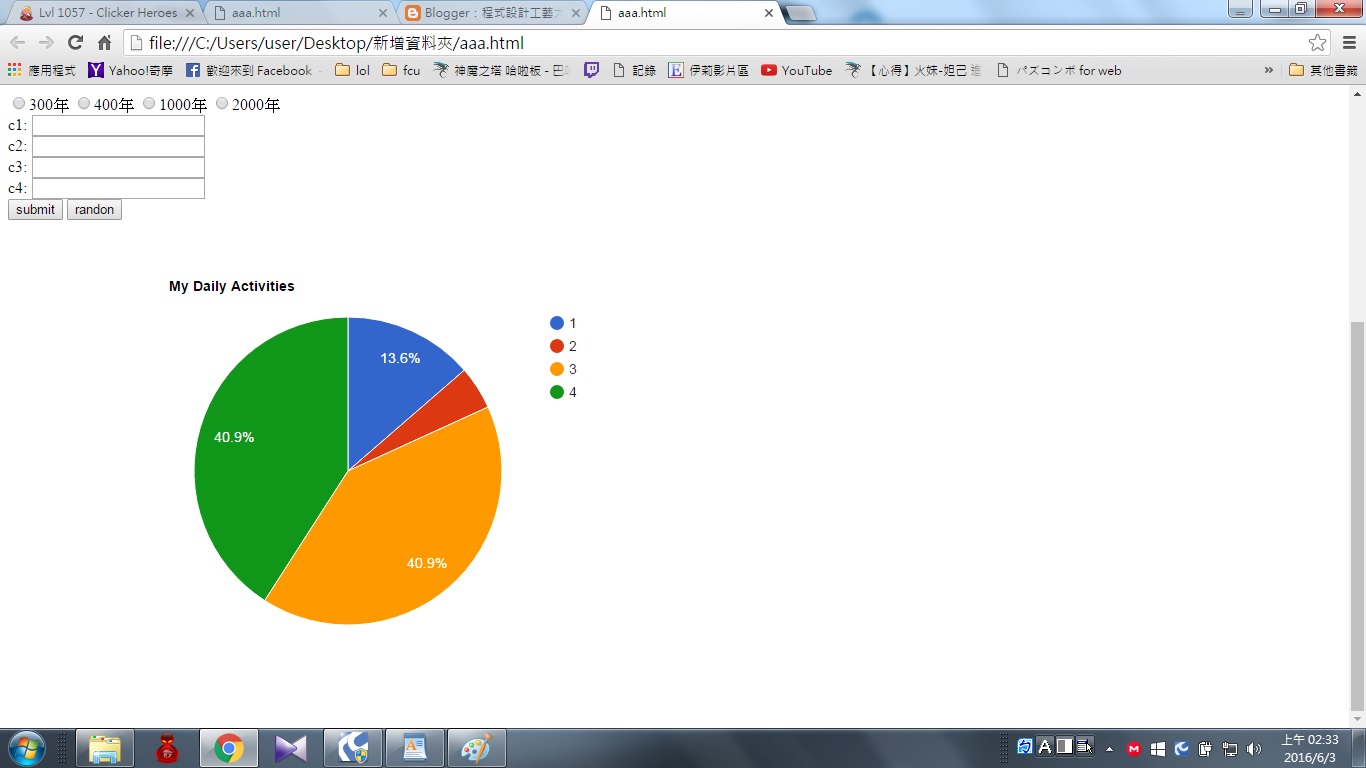
隨機產生圓餅圖

<html>
  <head>
    <script type="text/javascript" src="https://www.gstatic.com/charts/loader.js"></script>
    <script type="text/javascript">
    google.charts.load('current', {'packages':['corechart']});
      google.charts.setOnLoadCallback(drawChart);

 var a ,b,c,d;
var n1,n2,n3,n4;
var n1=0;
var n2=0;
var n3=0;
var n4=0;
 function randon() {

var maxNum = 10;
var minNum = 0;
    n1= Math.floor(Math.random() * (maxNum - minNum + 1)) + minNum;
    n2= Math.floor(Math.random() * (maxNum - minNum + 1)) + minNum;
    n3= Math.floor(Math.random() * (maxNum - minNum + 1)) + minNum;
    n4= Math.floor(Math.random() * (maxNum - minNum + 1)) + minNum;

drawChart()
}


        function drawChart() {

        var data = google.visualization.arrayToDataTable([
          ['Task', 'Hours per Day'],
          ['1',     n1],
          ['2',      n2],
          ['3',  n3],
          ['4',  n4],    
]);

        var options = {
          title: 'My Daily Activities'
        };

        var chart = new google.visualization.PieChart(document.getElementById('piechart'));

        chart.draw(data, options);
      }
    </script>
  </head>
  <body>
<h1>1、ssss?</h1>
<input name="v1" type="radio" value="1">300年          
<input name="v1" type="radio" value="2">400年            
<input name="v1" type="radio" value="3">1000年
<input name="v1" type="radio" value="4">2000年
<br>
<h1>2、ssss?</h1>
<input name="v2" type="radio" value="1">300年          
<input name="v2" type="radio" value="2">400年            
<input name="v2" type="radio" value="3">1000年
<input name="v2" type="radio" value="4">2000年
<br>
<h1>3、ssss?</h1>
<input name="v3" type="radio" value="1">300年          
<input name="v3" type="radio" value="2">400年            
<input name="v3" type="radio" value="3">1000年
<input name="v3" type="radio" value="4">2000年
<br>
<h1>4、ssss?</h1>
<input name="v4" type="radio" value="1">300年          
<input name="v4" type="radio" value="2">400年            
<input name="v4" type="radio" value="3">1000年
<input name="v4" type="radio" value="4">2000年
<br>
c1:
<input type="text" name="FirstName" id="c1"<br><br/>
c2:
<input type="text" name="address" id="c2"<br><br/>
c3:
<input type="text" name="address" id="c3"<br><br/>
c4:
<input type="text" name="address" id="c4"<br><br/>

    <input type="button" value="submit" onclick="add()"/>
    <input type="button" value="randon" onclick="randon()"/>
    <div id="piechart" style="width: 900px; height: 500px;"></div>

  </body>
</html>